
What is Google Ads offline conversion tracking?
Published July 7, 2026 · Updated October 23, 2026
Offline conversion tracking sends qualified leads and closed deals from your CRM back to Google Ads, so Smart Bidding optimizes for revenue, not form fills.
Google Ads offline conversion tracking is the practice of sending conversions that happen away from your website, such as a qualified call, a booked appointment, or a signed contract, from your customer relationship management (CRM) system back into Google Ads, matched to the ad click that produced them.
Offline conversion tracking exists because the conversion Google can see on its own, the form fill, is rarely the conversion you care about. The sections below cover how the mechanics work, how we implement it for lead generation accounts, and what changes once your bidding can see revenue.
How does offline conversion tracking work?
Offline conversion tracking works by importing conversion events from your CRM back into Google Ads. Instead of the conversion history ending at the form fill, Google also learns which clicks turned into qualified leads, which turned into opportunities, and which turned into closed revenue, along with a dollar value for each stage.
The mechanics rest on a simple idea. Google tags every ad click with a unique identifier. If you store that identifier alongside the lead it produced, you can report back later: this click became a sales-qualified lead, that click became a customer worth $12,000, and those 40 clicks went nowhere. Google matches each uploaded event to the original click and everything it knows about that click: the keyword, the ad, the device, the location, the time of day, and the audience signals.
Once the loop is closed, Smart Bidding can weight its decisions by what your pipeline confirmed rather than treating every form fill as an equal win.
Why are form fills a weak signal for bidding?
Form fills are a weak signal for bidding because a form fill is not a customer. Most lead generation accounts are set up to optimize toward one event: the form submission. Someone clicks an ad, lands on a page, fills out a form, and Google Ads records a conversion. Smart Bidding then optimizes toward more people who resemble the ones who converted.
In most lead-dependent businesses, a fraction of inquiries become qualified conversations, and a fraction of those become revenue. When you optimize toward form fills, Google optimizes toward the people most likely to submit a form. That group includes your best future customers. It also includes price shoppers, job seekers, people outside your service area, and whatever bots got past your spam filters.
Accounts run this way plateau in a recognizable pattern. Cost per lead holds steady or even improves while the sales team reports that lead quality is slipping. Smart Bidding is doing exactly what it was told to do: buy form fills as cheaply as possible. Nobody told it that one of those leads was worth a $40,000 contract and another was worth nothing. From Google's side, the two conversions look identical.
Better ad copy or a tighter keyword list can't fix that. The fix is giving the algorithm better data to optimize against.
How do you set up offline conversion tracking?
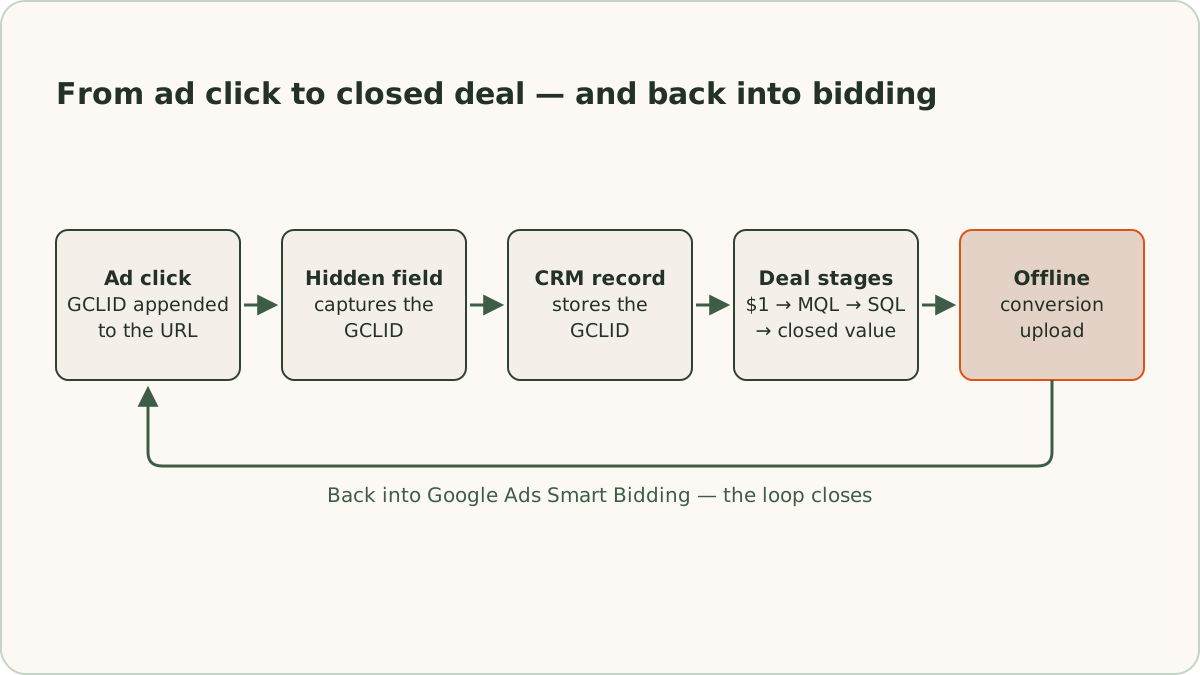
You set up offline conversion tracking as a loop with three legs: capture the click ID when the lead comes in, keep it with the lead as the lead advances, and upload staged conversion events back to Google Ads. Any leg can break silently, so we treat each one as its own checklist.
How do you capture the click ID?
You capture the click ID, the Google click identifier (GCLID), with a hidden form field. Google appends the GCLID to your landing page URL when someone clicks an ad, as long as auto-tagging is enabled in your account settings. The parameter looks like ?gclid=CjwKCAjw... and typically runs 50 to 100 characters.
In the standard capture method, a small script reads the click ID from the URL when the page loads, stores it, and drops it into a hidden input that submits along with the rest of the form. ReClick's script captures all three click IDs Google can add: the gclid parameter, and the wbraid and gbraid parameters Google sends in its place on some traffic from Apple devices. We also write the values to localStorage so they survive if the visitor browses several pages before converting. Some CRMs, including HubSpot and Pipedrive paired with certain form tools, offer native GCLID capture you can switch on instead.
Two details matter more than they look. A CRM field that stores the GCLID needs a limit of at least 100 characters, because a truncated GCLID will never match a click. And on multi-page journeys, the identifier has to persist to wherever the form lives, which the localStorage step (or a first-party cookie set to match your attribution window) handles.
How do you keep the click ID on the lead record?
Keep the click ID with the lead from the moment the form sends, so that when a deal reaches a stage worth reporting, the upload can find the click that started it. ReClick logs each click ID at form submission, with the lead's email address, phone number, and click time, in a click log kept outside the CRM, and stores it on the CRM record too where there's a field for it. The upload matches each CRM stage back to the log by email address or phone number, using the click that produced the original lead.
The separate log protects the ID from a common failure: a sales rep tidying up a record and clearing a field they don't recognize, which stays invisible until conversions stop matching. Where the CRM holds the ID as well, set that field to read-only.
Where do enhanced conversions for leads fit?
Enhanced conversions for leads is Google's upgraded version of offline conversion import, and ReClick turns it on in every account it manages. The form sends Google the lead's hashed email address and phone number, and a later upload with the same hashed details can still match when the click ID went missing, such as when the visitor converted on a different device.
Google now labels offline conversion import a legacy feature, in its guide to importing conversions from ad clicks using files, and its help pages point new setups to enhanced conversions for leads. The click ID doesn't go away: ReClick's uploads use it first, and the hashed details where there is none. We check each week that enhanced conversions is still active.
How do you set up the import in Google Ads?
In Google Ads, you set up the import under new conversion action, then Import, then a manual import from the API or an upload, tracking conversions from clicks. ReClick creates one conversion action per funnel stage per channel, such as a form lead, a qualified form lead, and a converted form lead, with matching actions for calls, each in Google's category for its stage. Every upload has to reference its conversion action exactly. A file upload matches on the action's name, and the match is case-sensitive.
We set each imported action's click-through conversion window to 90 days, the longest Google Ads allows, which fits most business-to-business and high-ticket sales cycles. Each action counts one conversion per click and uses data-driven attribution.
Each action also gets a primary or secondary designation. Primary conversions feed Smart Bidding. Secondary conversions are recorded for observation only. The designation does a lot of quiet damage when it's set wrong, so we're deliberate about it: ReClick bids on one funnel stage at a time, so only that stage's actions are primary, and every other stage stays secondary until bidding moves to it. Google's own automatic call action also stays secondary once call outcomes upload, or the same call counts twice.
How do you automate the upload?
We automate the upload from the CRM to Google Ads with a nightly workflow in n8n, an automation tool, run on a fixed daily schedule rather than on each stage change. The pattern is consistent regardless of the CRM behind it:
- Fetch: pull the last 90 days of leads from the CRM, with stage dates, email addresses, and phone numbers.
- Match: for each lead and stage, gather every key Google can match on: the click ID logged before the lead came in, with the hashed email address and phone number alongside it. A phone lead without a click ID is matched to Google's call log, and any other lead goes on its hashed email address and phone number alone.
- Upload: send each conversion with its evidence, action, UTC timestamp, value, and an order ID for the lead and stage, which Google uses to drop duplicates.
- Log: record what Google accepted and rejected. Accepted conversions are never re-sent, temporary errors retry the next night, and unexpected errors send an alert.
Because each run rebuilds the last 90 days from the CRM, a lead that advances a stage reaches Google Ads the next night. Older ReClick accounts ran the upload through Zapier on each stage change. Zapier suits a simple upload on the click ID alone, but it can't match on calls or hashed data, so those accounts move to the nightly workflow.
How do you test offline conversion tracking?
Test offline conversion tracking end to end: click one of your own ads, submit a test lead, verify the click ID landed in the click log, advance the stage by hand, run the upload once, and check the conversion diagnostics in Google Ads a day or two later. Google may not record a conversion imported within a day of its click, so an empty diagnostics screen on day one is normal.
Once uploads run, compare the conversions Google reports for each action with the number uploaded on click IDs. Anything above that count is enhanced conversions for leads at work.
Which funnel stages should you send to Google Ads?
Send Google Ads every qualification stage, not only closed deals, and bid on one stage at a time. The tempting move is to upload only closed deals, since that's the outcome you care about. In practice, closed deals alone starve the system. Most lead generation accounts don't close enough deals per month to give Smart Bidding a usable signal, and a 60-day sales cycle means the feedback arrives 2 months late.
Our approach is progressive. ReClick moves bidding down the funnel one stage at a time:
- Form submissions. A new account starts on Maximize Conversions, bidding on form submissions, with calls counted as the same stage.
- Qualified leads. Once a campaign, or a shared bidding strategy across several campaigns, records 30+ qualified leads in 30 days, bidding moves to qualified leads, and the form and call actions move to secondary.
- Converted leads. Once closed deals reach 30 or more in 30 days, bidding moves to them in the same way.
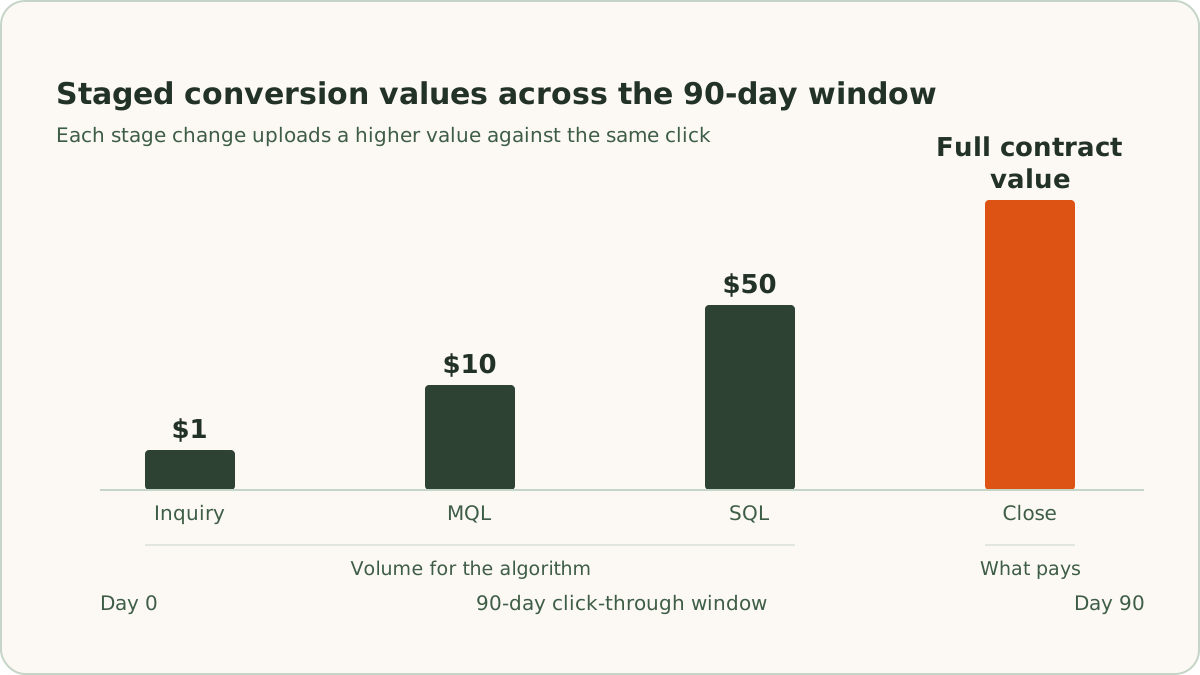
Each move waits until the next stage's tracking, calls included, is working and verified. The other stages keep uploading as secondary, so reporting sees the whole funnel. Each stage also carries a value that steps up as the lead proves itself, up to the full contract value at close. The staged values come from the same framework we use for our lead scoring model, so the numbers Google optimizes toward are the same numbers the sales team already agrees represent lead quality.
How do you set the value of each stage?
Set each stage's value from your actual deal values where the CRM has them, and from relative values where it doesn't. Where the CRM holds the deal value, we pass it rather than a fixed number. Without clean deal values, the proportions between stages matter more than the dollar amounts, so we set each stage as a multiple of the one before, starting from the share of leads that reach it. For example, if 1 in 10 inquiries becomes a marketing-qualified lead (MQL) and 1 in 5 of those becomes a sales-qualified lead (SQL), $1 at inquiry, $10 per MQL, and $50 per SQL keep those proportions.
When do stages have to be uploaded?
Stages have to be uploaded within the click-through conversion window, which Google Ads caps at 90 days, so set each imported conversion action to the full 90 days. A stage that routinely happens more than 90 days after the click won't attribute, so bid on the latest stage that reliably happens inside the window.
What changes once bidding sees revenue?
Once the stage bidding uses carries real deal values and has the volume, you can move from Maximize Conversions or Target CPA (target cost per action) to value-based strategies like Maximize Conversion Value or Target ROAS (target return on ad spend). Bidding starts paying more for clicks that resemble past deal-producers and less for clicks that resemble past dead ends. Bidding does that across dimensions no one manages by hand: query phrasing, device, hour, location, audience membership, and combinations of all of them.
A Target ROAS starts from the ROAS at which your margin just covers the ad spend. The breakeven ROAS calculator works that number out from your margin, and a target below it spends more on ads than the deals return in margin.
How does reporting change?
Reporting changes because cost per lead stops being the number to judge. Judge the switch on cost per qualified lead and cost per sale instead, over a window long enough for your sales cycle to complete. We give bidding changes room to stabilize before reading them, and when a read is early we label it directional rather than calling a winner.
Can cost per lead rise after the switch?
Yes. Cost per lead often rises after the switch, because the system is deliberately paying a premium for clicks more likely to qualify. The rise can look alarming if you're not ready for it. What should fall is cost per qualified lead and cost per sale.
What doesn't offline conversion tracking change?
Offline conversion tracking doesn't change what you pay per click. Offline conversion data improves the bidding side of the account, and only that side. What you pay per click is still governed by the auction, where Quality Score works through expected click-through rate, ad relevance, and landing page experience, as how Quality Score lowers cost per lead explains. The accounts that keep improving do both: cheaper clicks from tight message match, and better-chosen clicks from revenue-weighted bidding.
What breaks offline conversion tracking?
Offline conversion tracking breaks most often on a short list of setup mistakes. These are the ones we check first:
- Bad timestamps. The top cause of failed imports. Use ISO 8601 with an explicit timezone offset, make sure the conversion time is after the click time, and keep it inside the attribution window.
- Uploading too soon. Google may not record a conversion imported within a day of its click, even when the GCLID is valid. A nightly upload that retries what Google wasn't ready for handles it.
- Truncated GCLIDs. A field capped at 50 characters silently cuts identifiers that run longer, and every affected conversion fails to match. Give the field at least 100 characters.
- Name mismatches. The conversion action name in a file upload must match Google Ads exactly, including case. "CRM - SQL" and "CRM-SQL" are different actions, and one of them doesn't exist.
- Duplicate uploads. Two automations firing on the same stage change, or a CRM workflow that loops, will double-count. Set the conversion count to "One" for lead generation, and give each upload an order ID for the lead and stage, so Google drops the second copy.
- No ongoing monitoring. A broken upload fails quietly. ReClick's nightly workflow logs every upload and alerts on an unexpected error, and each week we compare Google Ads conversions with CRM leads, after a few days for lag. A gap of more than 10 to 20% means we audit the tracking before changing anything else.
The diagnostics screen under each conversion action tells you which failure you have: "click not found" points to capture or truncation problems, "outside attribution window" points to timing, and "invalid timestamp" points to formatting.
When should you set up offline conversion tracking?
Set up offline conversion tracking before you scale spend. Offline conversion tracking is the difference between an account that gets efficient at buying form fills and an account that gets efficient at buying customers. Capture the GCLID at the form, keep it with the lead, upload staged values as leads advance, and let bidding learn from revenue.
Offline conversion tracking is plumbing work, and it's some of the highest-leverage work in a lead generation account. That is why it's a standard part of ReClick's paid search management for lead generation. Across the $10.75M in ad spend we've managed in the last 12 months, the accounts with this loop in place are the ones where raising the budget raises revenue rather than unqualified lead volume.
Frequently asked questions
Quick answers to the questions readers ask most about this topic.
Offline conversion tracking in Google Ads sends conversions that happen away from your website, such as a qualified call, a booked appointment, or a signed contract, from your CRM back into Google Ads, matched to the ad click that produced them. Offline conversion tracking exists because the form fill Google sees on its own is rarely the conversion you care about. Smart Bidding optimizes toward whatever conversions you feed it.
Google Ads matches offline conversions to clicks through the GCLID, a unique identifier Google appends to your landing page URL when auto-tagging is enabled, and, with enhanced conversions for leads, through the lead's hashed email address or phone number. A hidden form field captures the GCLID when the lead comes in, and the upload references it. Google then matches the conversion to the original click and everything it knows about that click: the keyword, the ad, the device, the location, and the time of day.
No. Upload every stage, and bid on one stage at a time. Most lead generation accounts do not close enough deals per month to give Smart Bidding a usable signal, and a long sales cycle means the feedback arrives months late. ReClick starts a new account bidding on form submissions, moves bidding to qualified leads once a campaign records 30+ of them in 30 days, and moves it to closed deals once there are 30 or more of those in 30 days. The stages bidding isn't using still upload, as secondary conversions.
Offline conversion uploads fail most often because of malformed timestamps: use ISO 8601 with an explicit timezone offset, and make sure the conversion time falls after the click time. Other frequent causes are uploading within a day of the click, before Google can record it, GCLIDs truncated by a short CRM field, and conversion action names that do not match Google Ads exactly, since the match is case-sensitive. The diagnostics screen under each conversion action tells you which failure you have.

Written by
Founder & CEO, ReClick
Corey runs Google Ads, landing page, and email nurture programs for businesses that rely on lead generation.
Keep reading
Offline conversion tracking for phone calls
Call tracking ties each phone lead to the Google Ads click behind it, so bidding learns from qualified calls instead of from every dial.