
How do you build a simple lead scoring model?
Published June 23, 2026 · Updated October 23, 2026
A simple lead scoring model needs no expensive software: fit and behavior rules, dollar values Google Ads can bid on, and thresholds your sales team trusts.
You build a simple lead scoring model by writing a few fit and behavior rules with your sales team, scoring each lead in dollars that step up as it qualifies, and setting three thresholds that decide who gets a call, who gets nurture, and who goes to a long-term list.
A spreadsheet or a customer relationship management (CRM) system is enough to start. The same dollar values then go back into Google Ads as offline conversions, so bidding learns which clicks produce revenue.
What is lead scoring?
Lead scoring is the practice of assigning a value to every lead so you can treat leads differently. A lead scoring model has three jobs. It tells sales who to call first. It tells your nurture system what to do with everyone who isn't ready for a call. And it tells your ad platform which clicks produced revenue, so the platform can bid for more clicks like them.
Most guides cover the first two jobs and skip the third. The third job is the one that keeps paying. Better call prioritization saves your team hours this week. Feeding scores back into Google Ads changes what you pay for leads every week after.
The underlying problem is simple. Every form fill costs about the same to generate. A lead from a buyer with a budget and a timeline is worth many times more than a lead from someone collecting quotes for a school project. If your reporting treats them as equal, your ad spend drifts toward whichever audience fills out forms most cheaply. Scoring is how you push back.
What do you need to build a lead scoring model?
To build a lead scoring model, you need three things: a CRM or a spreadsheet with a few extra fields, agreement from sales on what makes a lead worth pursuing, and a reliable way to record when a lead changes stage. With those in place, you can build the first version of your model in an afternoon.
Why should the first model be simple?
The first model should be simple because sales has to trust it. A rep who can't explain why a lead scored 85 will ignore the score and go back to working leads in the order they arrived. A rep who knows a lead scored high because it's in the service area, named a budget, and asked for a call this week will pick up the phone. Every rule you add that sales didn't help write erodes that trust a little.
Do you need expensive lead scoring software?
No. Enterprise scoring platforms sell machine-learned predictive models, intent data feeds, and dashboards with confidence intervals, and almost none of that is necessary at the start. In our work with 35+ businesses that rely on lead generation, the scoring model that survives contact with a real sales team is almost always the simple one: a handful of honest rules, applied consistently, written down where everyone can see them.
Which signals go into a lead scoring model?
Two kinds of signal go into a lead scoring model: fit and behavior. Every workable model combines them, and it helps to keep them separate.
What are fit signals?
Fit signals answer whether a lead could ever be a good customer, regardless of what the lead does next. Typical fit signals are service area, company or project size, stated budget, industry, and timeline. Fit is mostly captured on the form or during the first call, and it rarely changes afterward.
Every fit field you add to a form costs you conversion rate. Capture the two or three fields you need in order to disqualify, and collect the rest after the lead converts. On several of our accounts, we use a short questionnaire inside the welcome email sequence to capture timeline and budget after the fact. The questionnaire keeps the form short without giving up the data.
Fit rules tend to be blunt, and that's fine. In service area, add points. Out of service area, disqualify entirely rather than subtracting points. Stated budget above your minimum, add points. Timeline inside 30 days, add points.
What are behavior signals?
Behavior signals answer whether the lead is moving toward a purchase right now. Behavior is where most models get noisy, because not all behavior is worth the same.
Email opens are the weakest signal you can track, since many mail clients load messages automatically whether or not a person read them. Clicks are better. Replies, visits to a pricing page, a booked call, or a download of a bottom-of-funnel asset (a pricing guide, not a general blog post) are stronger still. The strongest behavior signals are the ones your sales team records: the lead answered the phone, showed up to the appointment, or asked for a formal quote.
The mechanics matter as much as the signals themselves. On one of our accounts, a lead's status on the sales board now triggers email tags automatically, replacing a manual spreadsheet upload that happened whenever someone got around to it. The signals were identical before and after. The difference is that the score now updates the day the behavior happens, so routing and nurture react while the lead is still paying attention.
Should you score leads in points or dollars?
Score leads in dollars rather than points. Points are the standard approach: assign a value to each rule, add them up, and act on the total. For example: in service area +20, budget stated +15, timeline under 30 days +15, booked a call +30, replied to an email +10, and free-mail address with no company info −10. A lead that's in the service area, names a budget, has a timeline under 30 days, and books a call scores 80 and goes straight to sales. A lead in the service area that only filled out the form scores 20 and enters nurture.
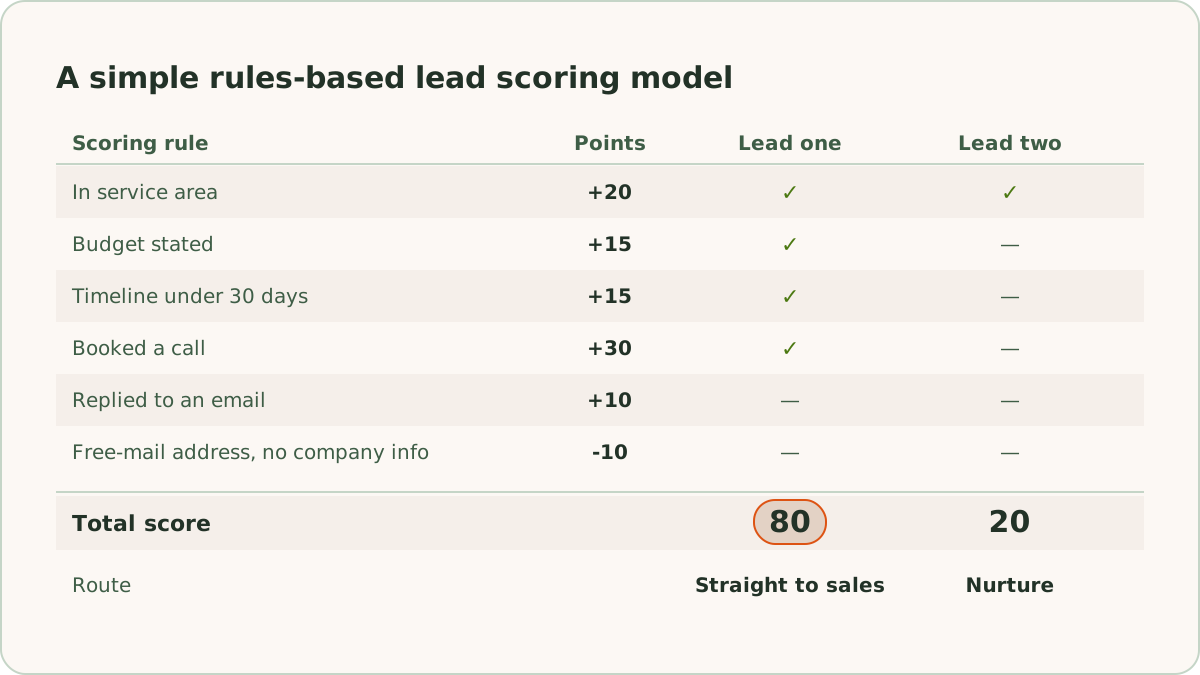
Points work, but they have one persistent problem: nobody outside marketing knows what a point is worth, so the scores never leave the marketing dashboard.
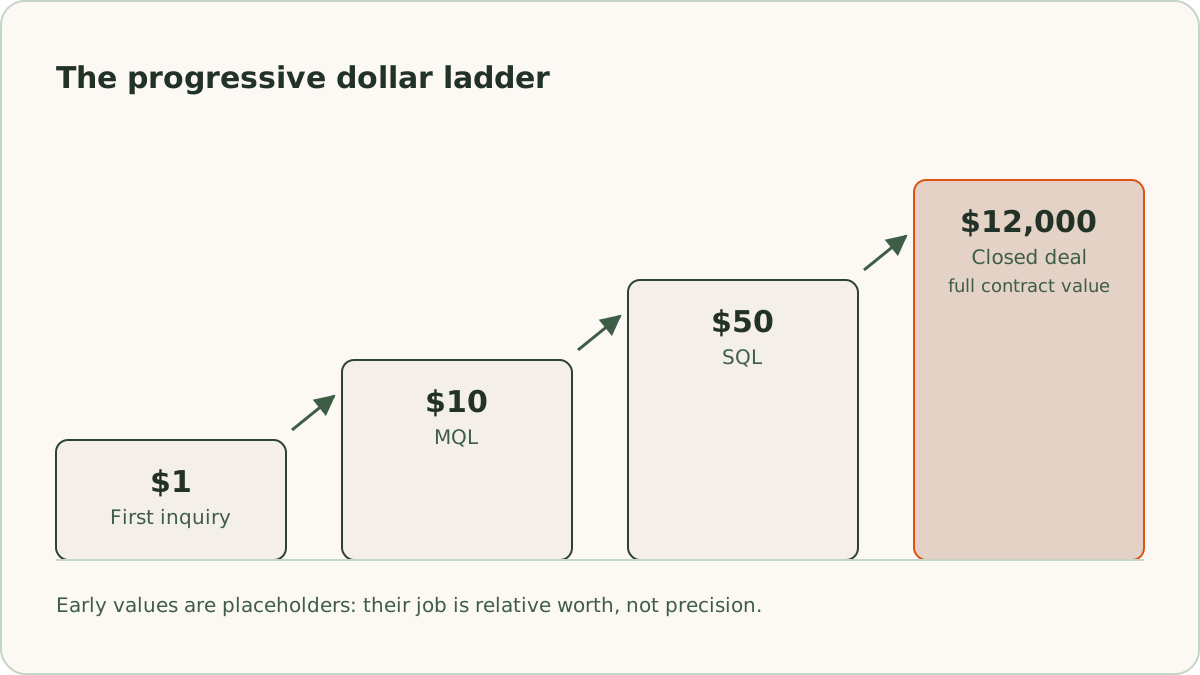
We score in dollars instead, and we do it progressively. A brand-new inquiry gets a value of $1. When it qualifies as a marketing-qualified lead (MQL), the value steps up. When sales accepts it as a sales-qualified lead (SQL), the value steps up again. When the deal closes, the lead is scored at the full contract value. For example, a ladder might run $1 at inquiry, $10 at MQL, $50 at SQL, and the actual contract amount, say $12,000, at close. The early numbers are placeholders. Their job is to establish relative worth, not to be precise. If you're not sure where the MQL stage ends and the SQL stage begins, MQL vs SQL covers how we draw the line.
Dollar scoring has two advantages over points. Everyone in the business understands it without translation. And Google Ads can ingest it.
How do you set lead scoring thresholds?
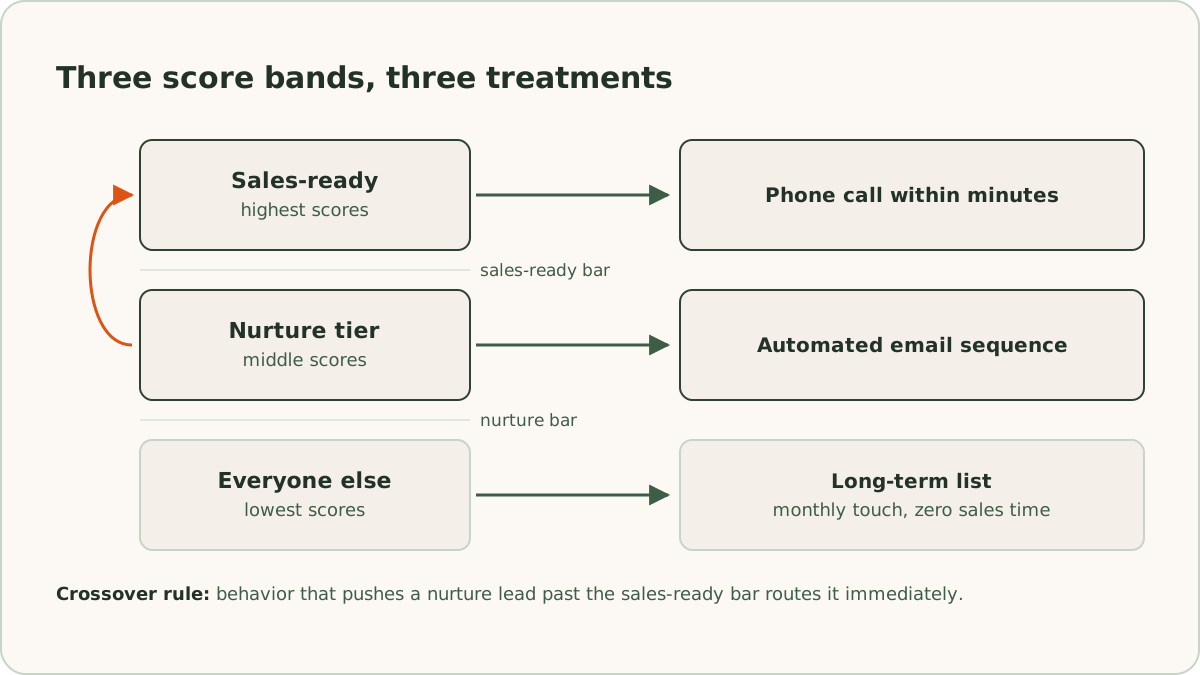
Set lead scoring thresholds for three tiers, because a score does nothing until it changes what happens next. Sales-ready leads get a phone call fast, ideally within minutes. Nurture-tier leads enter an automated email sequence. Everyone else goes to a long-term list that gets a monthly touch and zero sales time.
Resist the urge to build seven tiers with hand-offs between them. Every additional tier is another boundary to argue about and another routing rule that can break silently.
To set the initial thresholds, pull the last 90 days of closed deals and look at what they had in common at the moment they first came in. Then set the sales-ready bar so that most of those winners would have crossed it on day one. If you don't have the history, set the bar by sitting down with sales and arguing it out, then correct it at the first quarterly review. A threshold picked by argument and fixed with data beats a threshold you never revisit.
How do you route leads by score?
You route leads by score by giving each tier a defined treatment, automated wherever possible.
Sales-ready leads should route to a rep the moment they cross the bar, with the reasons attached: the fields and actions that produced the score, not the number alone. A rep who sees "named a $30,000 budget, booked for Thursday" works the lead differently than a rep who sees "score: 87."
The middle tier is where the nurture sequence matters most, because a nurture sequence is also your behavior-signal generator. Build emails that give the lead something to do: a case study worth replying to, a guide worth downloading, a breakdown of what projects cost at different budget levels, or a direct question about timing. Every action feeds the score. Our guide to lead nurturing lays out how we structure these emails.
One rule ties the tiers together: when behavior pushes a nurture lead past the sales-ready threshold, route it immediately. Don't make a sales-ready lead finish the sequence.
How do you upload lead scores to Google Ads?
You upload lead scores to Google Ads as offline conversions, and the upload is why we score in dollars. Each step of the ladder goes to Google Ads with its dollar value attached, matched to the original ad click through the click ID we capture on the form and store in the CRM. Google accepts these uploads across a 90-day window after the click, which covers most lead generation sales cycles.
The effect on bidding is the point of the whole exercise. Without offline conversions, Smart Bidding optimizes for form fills, and it will buy you cheap form fills from people who never answer the phone. With progressive dollar values flowing in, the system learns which campaigns, keywords, and audiences produce leads that reach $50 and $12,000, and it shifts spend toward them. Across the 20,000+ leads we've generated for clients, the accounts with this feedback loop running are the ones where cost per qualified lead falls over time, not just cost per raw lead.
A few implementation rules we hold to from our own setup checklist: only mark a stage as a primary conversion if you want bidding to optimize toward it, get the timestamps right (malformed times cause more failed uploads than anything else), and wait at least a day after the click before uploading so the platform can match it. The full setup, including click ID capture and the CRM automation, is in our guide to Google Ads offline conversion tracking.
How often should you review a lead scoring model?
Review a lead scoring model quarterly. We revisit scoring rules and thresholds every quarter, and we treat each change the way we treat any account experiment: we write down the expected effect before making it. Not "adjust the budget rule" but "raise the budget threshold because too many small projects are reaching sales, which should cut sales-ready volume without cutting closed deals." The next quarterly review then tests a specific prediction instead of a general impression.
What does the quarterly review check?
The quarterly review checks two questions. First, of the leads we scored sales-ready last quarter, how many closed? If the answer is few, your rules are too loose, and it's usually a fit rule that needs tightening. Second, of the deals that closed, how many scored sales-ready when they first arrived? If good deals came in scored low, some signal you're not capturing predicted them, and your job is to find it. Ask the reps, who usually know.
Audit the plumbing on the same schedule. Compare what your CRM says happened against what the ad platform recorded, because a quietly broken automation can starve your bidding data for months before anyone notices.
Should you change the model between reviews?
No. Leave the model alone until the next quarter. Smart Bidding needs stable conversion definitions to work with, and a model that gets redefined monthly keeps the algorithm in a permanent state of relearning.
When do you need more than a rules-based model?
You need more than a rules-based model when one of three things happens: you sell multiple products with very different values and one score can't represent them, your lead volume grows to the point where patterns exist that no one can see by eye, or your sales team grows past the size where everyone can agree on the rules in one meeting. In our experience, the rules-based model has a long useful life until then.
Predictive scoring tools need volume to train on. Below a few hundred leads a month, the handwritten model usually wins anyway, because you can see the whole picture and the software can't. Even when you do move on, the destination doesn't change. Scores still convert to dollars, and dollars still flow to the ad platform as offline conversions. A more sophisticated model changes how the score is computed, not where it goes.
What does a complete lead scoring model include?
A complete lead scoring model is a spreadsheet's worth of rules: fit signals sales helped write, behavior signals your emails and reps generate, dollar values that climb from $1 to contract value, and a quarterly review that keeps the rules current. ReClick builds and runs this model as part of email marketing for lead generation, wired into Google Ads management so the scores set the bids instead of sitting in a dashboard.
Frequently asked questions
Quick answers to the questions readers ask most about this topic.
Lead scoring is the practice of assigning a value to every lead so you can treat leads differently. A scoring model has three jobs: it tells sales who to call first, it tells your nurture system what to do with everyone who isn't ready for a call, and it tells your ad platform which clicks produced revenue so it can bid for more clicks like them.
No, not at the start. You need a CRM or a spreadsheet with a few extra fields, agreement from sales on what makes a lead worth pursuing, and a reliable way to record when a lead changes stage. With those in place, you can build the first version of a rules-based model in an afternoon. In our experience, the simple, explainable model is the one sales teams trust and use.
Score leads with dollars. Points work, but nobody outside marketing knows what a point is worth, so the scores never leave the marketing dashboard. We score in dollars progressively: $1 at first inquiry, stepping up at each qualification stage, and the full contract value when the deal closes. Everyone in the business understands dollars without translation, and Google Ads can ingest them as offline conversion values.
Review a lead scoring model quarterly. The review comes down to two questions: of the leads scored sales-ready last quarter, how many closed, and of the deals that closed, how many scored sales-ready when they first arrived. Write the expected effect of any rule change before making it. Then leave the model alone until the next review, because Smart Bidding needs stable conversion definitions to learn from.

Written by
Founder & CEO, ReClick
Corey runs Google Ads, landing page, and email nurture programs for businesses that rely on lead generation.
Keep reading
MQL vs SQL: what's the difference?
An MQL is a lead marketing qualifies from its data, and an SQL is one sales has worked and accepted. How to define both, run the handoff, and set the line.