
Offline conversion tracking for phone calls
Published July 28, 2026 · Updated October 23, 2026
Call tracking ties each phone lead to the Google Ads click behind it, so bidding learns from qualified calls instead of from every dial.
Offline conversion tracking for phone calls ties each inbound call to the Google Ads click that produced it, and uploads the qualified calls back to Google Ads as conversions. Bidding then learns from qualified phone conversations the same way it learns from qualified form leads.
Phone leads have a data problem that form fills don't. A form submission fires a conversion on your website, and the click ID is already in the URL. From there, the loop in our guide to Google Ads offline conversion tracking runs end to end for form fills. A phone call starts none of that on its own. Call tracking closes the gap. It is the phone half of the same offline conversion system. ReClick runs it for clients whose buyers pick up the phone, with the call tracking or phone system each client already uses, such as CallRail.
Why are phone leads invisible to Google Ads?
Phone leads are invisible to Google Ads by default because neither of the 2 ways a caller reaches you records a lead. The caller either taps the call button on your ad and dials straight from the search results, or clicks through to your landing page and calls the number printed on it.
Google has partial visibility into the first path and none into the second. Call assets (formerly call extensions) route through a Google forwarding number, so Google can report that a call happened and how long it lasted. What Google records is a dial, not a lead. Wrong numbers, vendors, existing customers calling about an invoice, and a 9-second misdial all count. If you set "calls from ads" as a primary conversion, Smart Bidding will optimize toward people likely to dial. Dialing is a much lower bar than becoming a lead.
The landing page path is worse. Someone clicks your ad, reads the page, and calls the number on it. Without call tracking, that call creates no conversion event at all. Google sees a click that apparently went nowhere. The keyword that produced your best phone lead of the month looks identical to a keyword that produced a bounce.
How do untracked calls distort cost per lead?
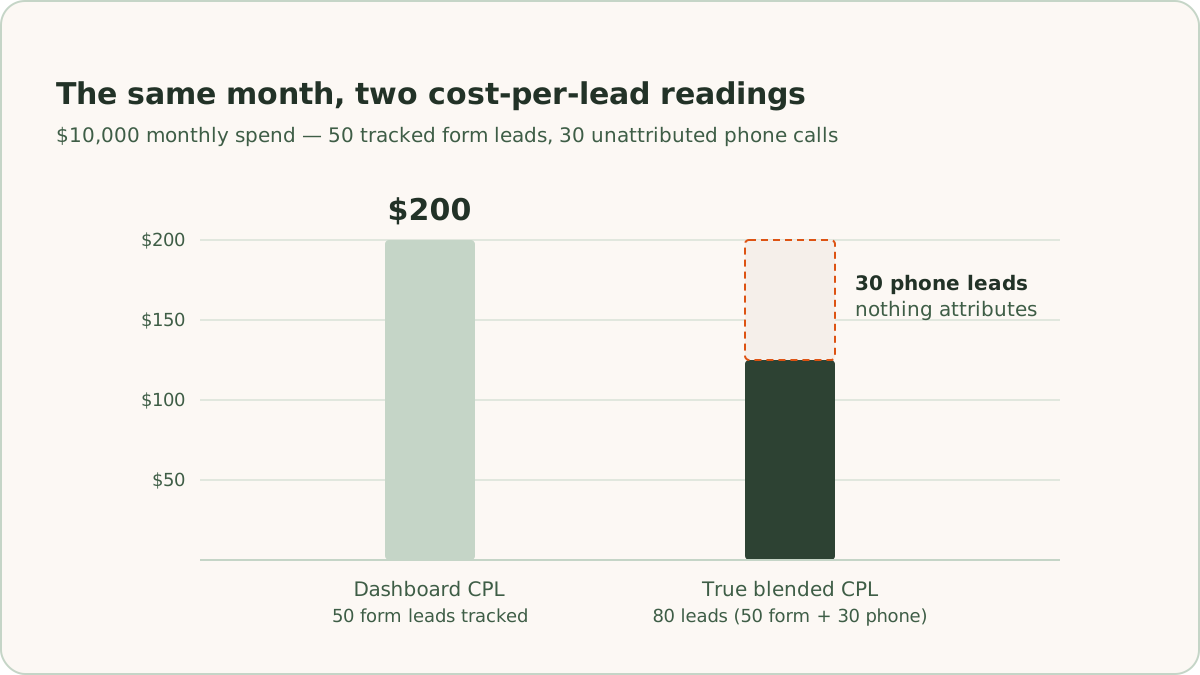
Untracked calls make cost per lead (CPL) look higher than it is, and they put the keywords that produce calls at risk of bid cuts. For example, take an account spending $10,000 a month that records 50 form leads. The dashboard reads $200 per lead. If the phone produces another 30 leads that nothing attributes, the true blended CPL is $125. The keywords generating those calls are the ones most likely to get their bids cut, because on paper they produce nothing.
How does call tracking connect a call to a click?
Call tracking connects a call to a click with 4 mechanisms that work together.
Dynamic number insertion (DNI). A script on your site swaps the visible phone number for each visitor. A visitor from a Google Ads click sees a tracking number drawn from a pool, and a visitor from organic search sees a different one. When the call comes in, the platform knows which session dialed, because that session was the one shown that number.
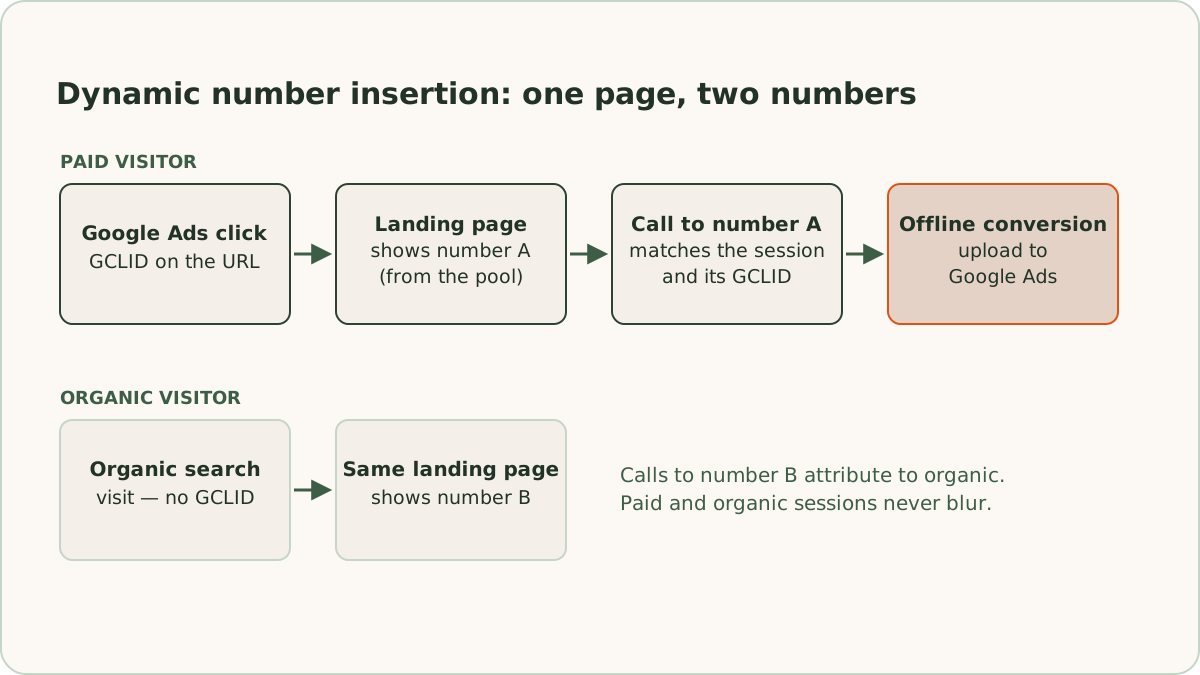
Session-level click data. Because DNI matches the call to a session, the platform can capture everything the session carried. That includes the source, the landing page, and the Google click identifier (GCLID) that Google appended to the URL when the ad was clicked. The GCLID is the key Google uses to match an uploaded conversion back to a specific click, so it is what makes offline conversions for calls that start on your site possible.
Per-source static numbers. Some placements can't run a script, such as a Google Business Profile, a directory listing, or a printed piece. A fixed tracking number for each of those sources keeps the channels separate, even without session detail.
Recording and duration. Every tracked call carries a duration. Recording, where it is legal and disclosed, lets a person decide later whether the call was a lead. That review step matters more than any of the plumbing, as the setup below shows.
ReClick works with the call tracking or phone system each client already runs, such as CallRail. What the setup needs from it is the caller's number, the time each call started, and a way to get call data out, plus DNI with GCLID capture for calls that start on your site. The setup below works with any platform that offers those.
How do you set up phone call conversion tracking in Google Ads?
ReClick sets up phone call conversion tracking in Google Ads in 7 steps, in the same order on every account.
1. Install the DNI script sitewide. The script belongs on every page, not only the landing page. Visitors browse before they call, so the number swap has to follow them to the contact page, the pricing page, and the footer of every page in between. A paid visitor who sees the real business line on any page can produce an unattributed call.
2. Size the number pool. DNI holds a tracking number for each active visitor session. If concurrent paid visitors outnumber the pool, 2 people see the same number at the same time, and attribution degrades to a guess. We size the pool against peak concurrent traffic on the pages that carry the script, with headroom. We revisit the size when traffic grows.
3. Verify the GCLID lands on the call record. Auto-tagging must be enabled in Google Ads. The tracking platform must capture the gclid parameter from the session and store it on the call record. We test the capture the same way we test form capture: click a live ad, place a call, and confirm the call record shows the click ID before building anything downstream. For calls placed from your ads, the matching check is in Google Ads: call reporting on, and every call asset set to use Google forwarding numbers with a call conversion action attached. Without the action attached, Google logs nothing about those calls.
4. Qualify before anything is uploaded. Qualification is the step that separates this setup from Google's native call counting. A minimum duration threshold is the first filter. For example, screening out calls under 30 seconds removes most misdials and abandoned calls before a person ever looks. Duration is a crude filter, though, because a 4-minute call can be a vendor and a 45-second call can be a booked appointment. The better filter is a person tagging each call as qualified, junk, vendor, or existing customer. Recordings make that tagging a fast daily pass rather than a project.
5. Map calls to the same stages as forms. A qualified call is the same funnel stage as a qualified form lead, so it gets its own conversion action beside the form's: a call lead, a qualified call, and a converted call, as far as the funnel goes. The stages, and the rules that move a lead between them, follow the same framework our guide to building a simple lead scoring model covers. A booked appointment, a tour, or a quote that comes from a call counts as qualified, and a closed deal as converted.
6. Upload within the click window. Qualified calls go to their own import conversion action in Google Ads, with a name such as "Qualified Call" that a file upload has to match exactly, since the match is case-sensitive. A call that started on your site uploads on its session's GCLID, with the caller's hashed phone number alongside it and the time the call qualified, inside the 90-day click-through conversion window. A call placed from your ad has no GCLID, so it uploads as an imported call conversion, matched on the caller's number and the call's start time against the log Google keeps for its forwarding numbers. Google's guide to importing phone call conversions lists both details, and the import works only for calls through a Google forwarding number. A call with neither a GCLID nor a match in Google's log goes up on the caller's hashed phone number alone. Google notes that conversions imported within a day of their click may not record yet, which a nightly upload allows for. The upload runs in ReClick's nightly n8n workflow, the same one that uploads form leads, so a call tagged qualified today reaches Google Ads on the next night's run.
7. Demote the dial counters. Once call outcomes upload, we move Google's native call conversions and raw call events out of the primary goal set, or the same call counts twice. They stay in the account as secondary, observation-only actions. Later, when bidding moves to qualified leads, the call lead action moves to secondary along with the form submissions. We made this exact change on one account a couple of weeks after CallRail went live with GCLID capture. Phone calls and form submissions came out of the default goals, so bidding leaned on qualified lead actions instead of high-volume contact events.
Calls placed straight from the search results are the one path DNI can't reach. The call asset path never loads your site, so there is no session GCLID for those calls. The imported call conversion in step 6 covers them instead, which is why every call asset needs a Google forwarding number with a call conversion action attached.
What can you optimize once calls are tracked?
Once calls are tracked, you can optimize 4 things: bidding, keywords, the data bidding trains on, and ad schedules.
Bid toward qualified calls, not dial clicks. ReClick bids on one funnel stage at a time. Once the account bids on qualified leads, qualified calls count in the same primary goal as qualified form leads, so Smart Bidding trains on conversations worth having. We move bidding to qualified leads only once call tracking for that stage is working and verified, so the move doesn't leave the phone half of the funnel out. Expect the same reporting shift that comes with any move to qualified conversions. Raw conversion counts can fall and cost per conversion can rise while cost per qualified lead improves, because the account has stopped buying cheap dials.
Find the call-heavy keywords. Some queries convert by phone at rates the form never shows. Urgent problems, complicated questions, and buyers who want a person on the line tend to dial. Law firms are the clearest example, as our page on PPC for law firms explains: intake runs through the phone, and the strongest cases often never touch a form. Once calls attribute to keywords, terms that looked weak on form fills sometimes turn out to be among the strongest lead producers in the account. Bids and budgets can then follow.
Keep junk out of the training data. Vendors, spam, and existing customers will call tracked numbers. If those calls upload as conversions, bidding learns from them. The duration threshold catches some, and human tagging catches the rest. The standing rule is that nothing reaches Google Ads without passing the qualification step.
Align ad schedules with staffed hours. Calls cluster when people can answer. An unanswered call is usually a lost lead, because the caller moves on to the next result. Answer speed on the phone is the same discipline as lead response time on forms, compressed from minutes to rings. Call tracking gives you the missed-call report. ReClick sets ad schedules and call assets to the hours the client really answers, and confirms how weekend and after-hours calls are handled.
What are the most common call tracking mistakes?
The 3 most common call tracking mistakes are tracking numbers pasted into ads, one static number for everything, and counting every call as a conversion. Together they account for most of the broken call setups we inherit.
Tracking numbers pasted directly into ads. A pool number placed in ad copy or a call asset bypasses DNI entirely, with no session, no source comparison, and no GCLID. Pool numbers also have a durability problem, because the provider can reassign them. A number printed in an ad, a directory, or a repeat customer's saved contacts can outlive its assignment. Call assets should use Google forwarding numbers that ring through to a dedicated line the phone system reports on, which is also what lets calls from ads be imported. Pool numbers should never appear anywhere durable.
One static number for everything. A single tracking number across the whole site confirms the phone rang and roughly which channel made it ring. A single number cannot connect a call to a session, a keyword, or a click. Nothing can be uploaded against a GCLID, so bidding gains nothing. The setup usually means a number pool was never configured, and it reports activity without producing usable signal.
Counting every call as a conversion. Counting every call is the most common of the 3. Every dial becomes a primary conversion, and the account looks productive. Meanwhile, the algorithm quietly optimizes toward whoever is most likely to pick up a phone, misdials and vendors included. When a sales team says lead quality is slipping while call conversions climb, counting every call is the first thing we check.
Why do phone leads need the same loop as form leads?
Phone leads need the same loop as form leads because an account that uploads qualified form fills but not calls is optimizing on partial data. For call-heavy businesses, the missing part is often the larger part. Phone leads can enter the same loop, move through the same stages, and count in the same bidding decisions. The only extra machinery is the tracking layer that gives each call a click to attach to.
ReClick builds and maintains that tracking layer as standard work in paid search management for lead generation. Bidding optimizes toward what it can see, so qualified calls need to be part of what it sees.
Frequently asked questions
Quick answers to the questions readers ask most about this topic.
No, Google Ads tracks phone calls only partly on its own. Call assets route through a Google forwarding number, so Google can report that a call happened and how long it lasted. What Google records is a dial, not a lead, so wrong numbers, vendors, and misdials all count. Calls to a number printed on your landing page produce no conversion event at all without a call tracking platform in place.
Dynamic number insertion (DNI) is a script that swaps the visible phone number on your site for each visitor. A visitor from a Google Ads click sees a tracking number drawn from a pool. When the call comes in, the platform knows which session dialed. The platform can then capture everything that session carried, including the Google click identifier (GCLID) needed to upload the call to Google Ads as an offline conversion.
No, not every phone call should count as a conversion. Counting every dial is the most common mistake in the call setups we inherit. If misdials, vendors, and existing customers upload as conversions, Smart Bidding quietly optimizes toward whoever is most likely to pick up a phone. Qualify calls first. A minimum duration threshold screens out most misdials, a person tags each call as qualified or junk, and only qualified calls upload, to a conversion action of their own.
Yes, with call conversion imports rather than a click ID. When someone taps the call button in the search results, your site never loads, so there is no session GCLID to capture. The call runs through a Google forwarding number instead, and Google logs when it started. ReClick matches each call in the client's phone system to that log by the caller's number and the start time, then uploads the qualified calls as imported call conversions. Google's own count of calls from ads stays as a secondary, observation-only action.

Written by
Founder & CEO, ReClick
Corey runs Google Ads, landing page, and email nurture programs for businesses that rely on lead generation.
Keep reading
What is Google Ads offline conversion tracking?
Offline conversion tracking sends qualified leads and closed deals from your CRM back to Google Ads, so Smart Bidding optimizes for revenue, not form fills.