
What is cost per MQL? Formula and examples
Published June 12, 2026 · Updated October 23, 2026
Cost per MQL is ad spend divided by marketing-qualified leads, not every form fill. How to calculate it, and why it beats cost per lead for budget decisions.
Cost per MQL is the ad spend it takes to generate one marketing-qualified lead (MQL): total ad spend divided by the MQLs that spend produced. An MQL is a lead that has passed your qualification bar. The bar is whatever criteria you and your sales team agree define a lead worth pursuing, such as the right company profile, a real project, and working contact information. Cost per lead (CPL) counts every form fill the same, whether it came from a buyer with budget and authority or from a student gathering quotes for a class project. Cost per MQL filters the unqualified leads out of the denominator before you divide.
The change from CPL sounds small, but it reorders your priorities. A campaign's cost per MQL reflects both what you paid for clicks and what share of the resulting leads were real. A campaign can't buy its way to a good cost per MQL with cheap, unqualified clicks. Expensive clicks that qualify at a high rate beat cheap clicks that don't, and cost per MQL makes that visible.
How do you calculate cost per MQL?
Calculate cost per MQL by dividing total ad spend by the number of MQLs that spend generated:
Cost per MQL = total ad spend ÷ MQLs generated by that spend
The math takes 10 seconds. Whether the result means anything depends on matching spend to the right leads and segmenting before you average.
Cost per MQL example
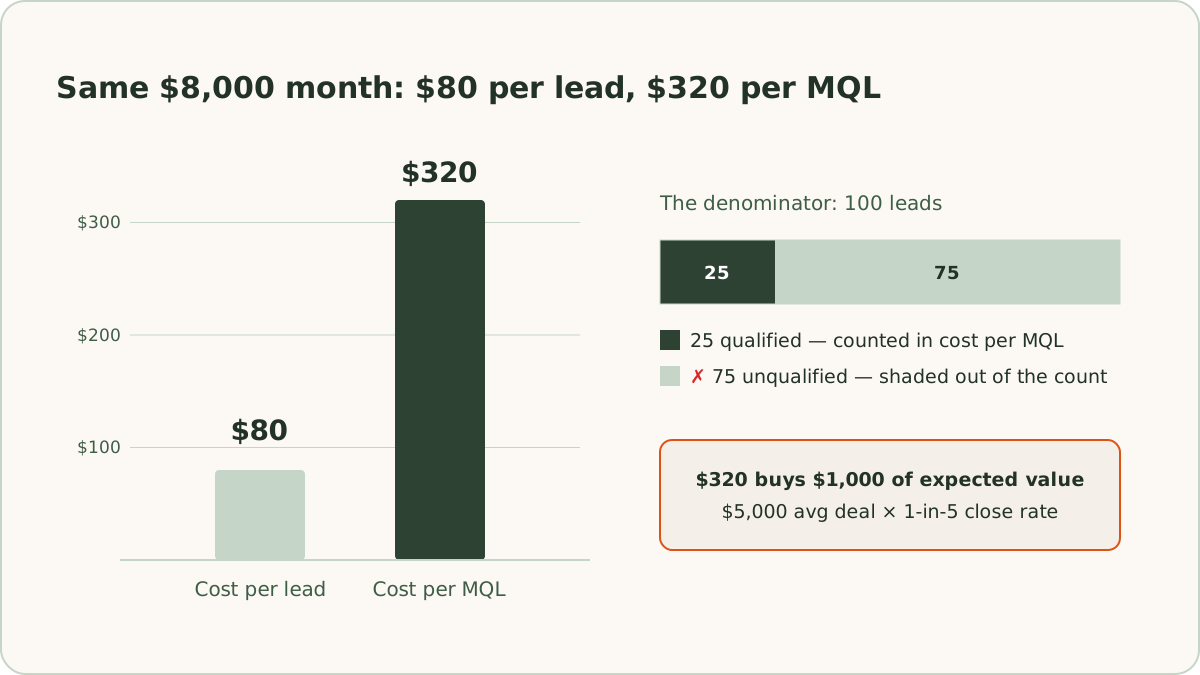
For example, you spend $8,000 in a month and generate 100 leads, a cost per lead of $80. Your sales team reviews the leads and accepts 25 as qualified. Cost per MQL is $8,000 ÷ 25, or $320.
Both numbers are true, but only cost per MQL tells you what a real prospect costs. Suppose your average deal is worth $5,000 and you close 1 in 5 MQLs. You are paying $320 for an MQL with an expected value of $1,000, and the account deserves more budget. The $80 figure can't support that reasoning, because 75 of the 100 leads it counted were never going to buy anything. The CPL calculator shows both metrics side by side for your own numbers.
The same example shows where the leverage is. Suppose nothing changes in the ad account, but you add an email and SMS nurture sequence for the 75 leads that didn't qualify on first contact. Some of them were real buyers who weren't ready yet. If nurture turns 10 of them into MQLs over the following weeks, the same $8,000 produces 35 MQLs. Cost per MQL drops from $320 to about $229, a change of about −29%, with no change to bids, keywords, or ads. ReClick runs nurture in the same system as the ad account, not as a separate project, for that reason. The follow-up process is a direct input to the metric you buy media against.
Which spend goes with which MQLs?
Match the spend to the leads it produced, not to the calendar. Leads often take days or weeks to qualify. The MQLs marked in your customer relationship management (CRM) system this month may trace back to clicks you paid for last month. Group leads into cohorts by creation date instead. Take the leads created in a period, count how many of them eventually became MQLs, and divide that period's spend by that count. Dividing this month's spend by this month's qualifications lets a slow qualification process make good months look bad and bad months look good.
Why segment cost per MQL by campaign?
Segment cost per MQL by campaign because budget decisions happen at that level. A blended, account-wide cost per MQL is a health check. The useful version is cost per MQL by campaign, and by ad group for your biggest campaigns.
Why is cost per MQL better for budget decisions?
Cost per MQL is better for budget decisions because it counts only the leads that cleared your qualification bar. CPL is total ad spend divided by total leads. CPL is easy to pull, easy to trend, and easy to compare across campaigns, which is why it shows up on nearly every dashboard we inherit. The basics of how to calculate cost per lead and where it fits are covered separately. In short, CPL works as an efficiency metric and misleads as a decision metric.
CPL's problem is the denominator. "Leads" includes everyone who filled out the form. A buyer with a real project and a budget counts as one lead. So do job applicants, existing customers looking for support, competitors doing research, and bots that slipped past the filters. CPL treats all of them as equal output.
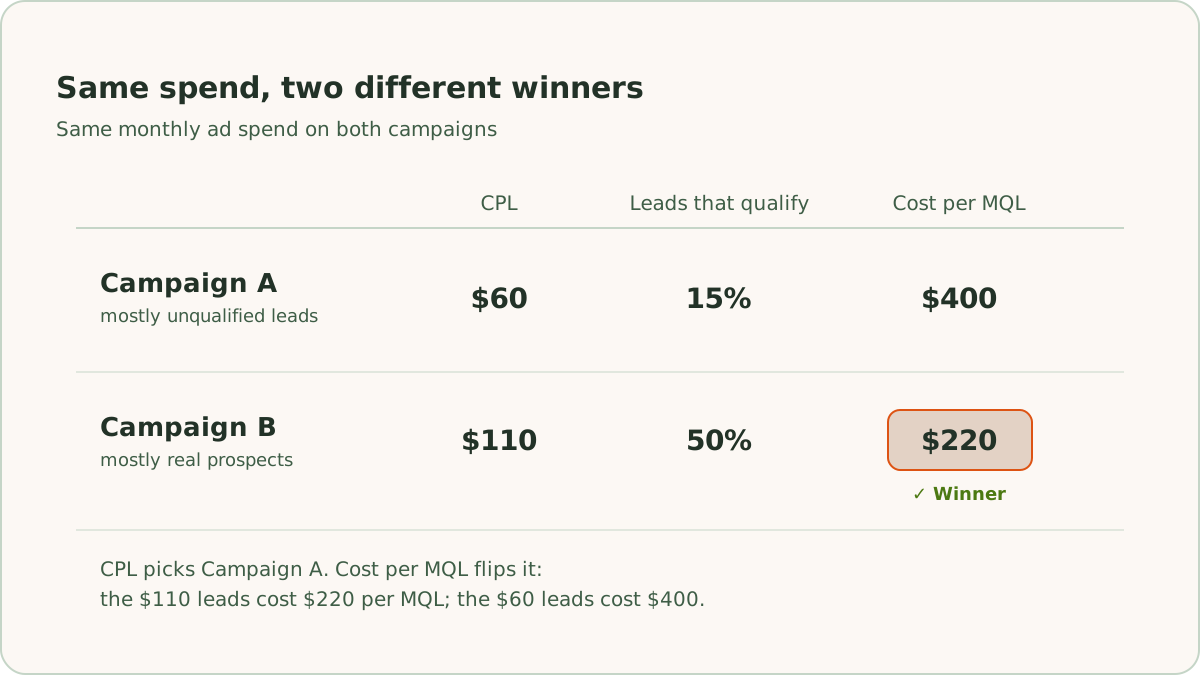
CPL's distortion gets expensive when you use it to allocate budget. For example, Campaign A produces leads at $60 and Campaign B produces leads at $110. On a CPL report, A wins and gets the next budget increase. Suppose A's leads qualify at 15% and B's qualify at 50%. A then costs $400 per MQL and B costs $220, so the CPL report pointed you in the wrong direction. You'd be scaling the campaign that generates activity and starving the one that generates revenue.
We see the pattern regularly in accounts we take over. The cheap campaign that looks best on the dashboard is often the one attracting the lowest-intent clicks, because low-intent clicks cost less to buy.
What do you need to calculate cost per MQL?
Calculating cost per MQL needs 2 things: a written MQL definition, and tracking that ties each lead back to the ad click that created it. Cost per MQL fails in practice when nobody agreed on what an MQL is, or when nobody can trace an MQL back to the spend that produced it. Both problems are fixable.
What makes a working MQL definition?
A working MQL definition is written down, agreed on with sales, and applied consistently. "Marketing thought it looked good" is not a definition. Criteria like company size, service area, project type, and contact validity are. If the bar moves month to month, the metric moves with it and stops meaning anything.
We handle the definition with progressive lead scoring rather than a single yes/no gate. A lead is worth $1 at first inquiry. Its value steps up as it clears each stage, all the way to full contract value when a deal closes. The MQL threshold is one rung on that ladder. If you're building your first scoring model, start with our guide to lead scoring.
How do you track an MQL back to its ad click?
Track an MQL back to its ad click by storing the click's identity on every lead record in your CRM. In Google Ads, that identity is the Google click identifier (GCLID). Google appends the GCLID to your landing page URLs when auto-tagging is on.
Our standard implementation is a hidden form field. The landing page reads the gclid parameter from the URL. The page stores the value in localStorage or a first-party cookie, so it survives multi-page visits. The page then writes the value into a hidden input that submits with the form. The CRM stores the GCLID in a dedicated field of at least 100 characters, because GCLIDs run 50 to 100 characters and a truncated one is useless. Some CRMs capture the GCLID natively, and most need the hidden-field approach. Either way, the test is simple: click your own ad, submit a test lead, and confirm the GCLID lands intact on the CRM record.
How do you send MQL data back to Google Ads?
Send MQL data back to Google Ads as offline conversions, so Smart Bidding optimizes toward qualified leads instead of raw form fills. Calculating cost per MQL in a spreadsheet is the first step. Feeding qualification data back into Google Ads is the bigger gain. The full setup is covered in offline conversion tracking in Google Ads.
How does the MQL import work?
The MQL import works through an import-type conversion action in Google Ads for the MQL stage. When a lead is marked qualified in the CRM, an automation sends the stored GCLID, the conversion time, and a conversion value back to Google Ads. We use Zapier for that automation on most accounts. Google matches the GCLID to the original click and credits the conversion to the exact campaign, ad group, and keyword that produced it. We upload these conversions across a 90-day click-through window, which covers the qualification lag on most lead generation sales cycles.
The import pays off in 2 places. Inside Google Ads, you can add the MQL conversion column to any report and read cost per MQL by campaign, ad group, or keyword, with no spreadsheet. Over time, Smart Bidding also finds more of the clicks that qualify, because it finally has data on which leads qualified.
Which import settings matter most?
The import settings that matter most are timestamps, upload timing, and which conversion action is primary:
- Timestamps. Conversion timestamps need a consistent format with the correct time zone, and the conversion time has to fall after the click. Malformed timestamps are the most common reason imports fail.
- Upload timing. Uploads should wait at least 24 hours after the click, so Google has finished processing it.
- Primary and secondary actions. The MQL conversion action should be set as primary so bidding uses it. Later stages stay secondary until you have enough volume to bid on them.
Can you check whether uploads match clicks?
Yes. Once the feed is live, the Diagnostics tab on the MQL conversion action shows whether uploads are matching clicks.
How do you use cost per MQL to reallocate budget?
Use cost per MQL to reallocate budget by shifting spend toward the campaigns with the lowest cost per MQL and away from the ones whose cheap leads never qualify. Once cost per MQL is visible by campaign, budget decisions get plainer. Pause or rebuild the segments where qualification rates sit near 0%, because that traffic was never worth buying at any CPL.
Why is cost per MQL noisier than cost per lead?
Cost per MQL is noisier than cost per lead because MQL counts are smaller than lead counts. For example, a campaign with 4 MQLs this month and 7 last month has not "gotten 43% worse." The campaign has a small sample. We hold reallocation decisions until the read is stable across enough volume. When we act on an unstable read anyway, we label the decision as directional and size it to match.
How does attribution change cost per MQL?
Attribution changes cost per MQL because it decides which campaign each MQL is credited to. Google Ads uses data-driven attribution by default, which spreads credit across the ad clicks on the path to a conversion. Accounts on last-click attribution give all the credit to the final click, which flatters bottom-of-funnel campaigns like branded search and undercounts the campaigns that introduced the buyer.
Should you cut a top-of-funnel campaign with a high cost per MQL?
No. Check its assisted conversions first. A campaign that rarely closes but often starts the conversion path is doing work the last-click number hides.
What are cost per SQL and cost per opportunity?
Cost per SQL is ad spend divided by sales-qualified leads (SQLs). Cost per opportunity divides ad spend by opportunities created, and cost per acquisition divides it by closed deals. On accounts with the tracking in place, we set up a separate offline conversion action for each stage. All of these metrics are then readable inside Google Ads alongside cost per MQL.
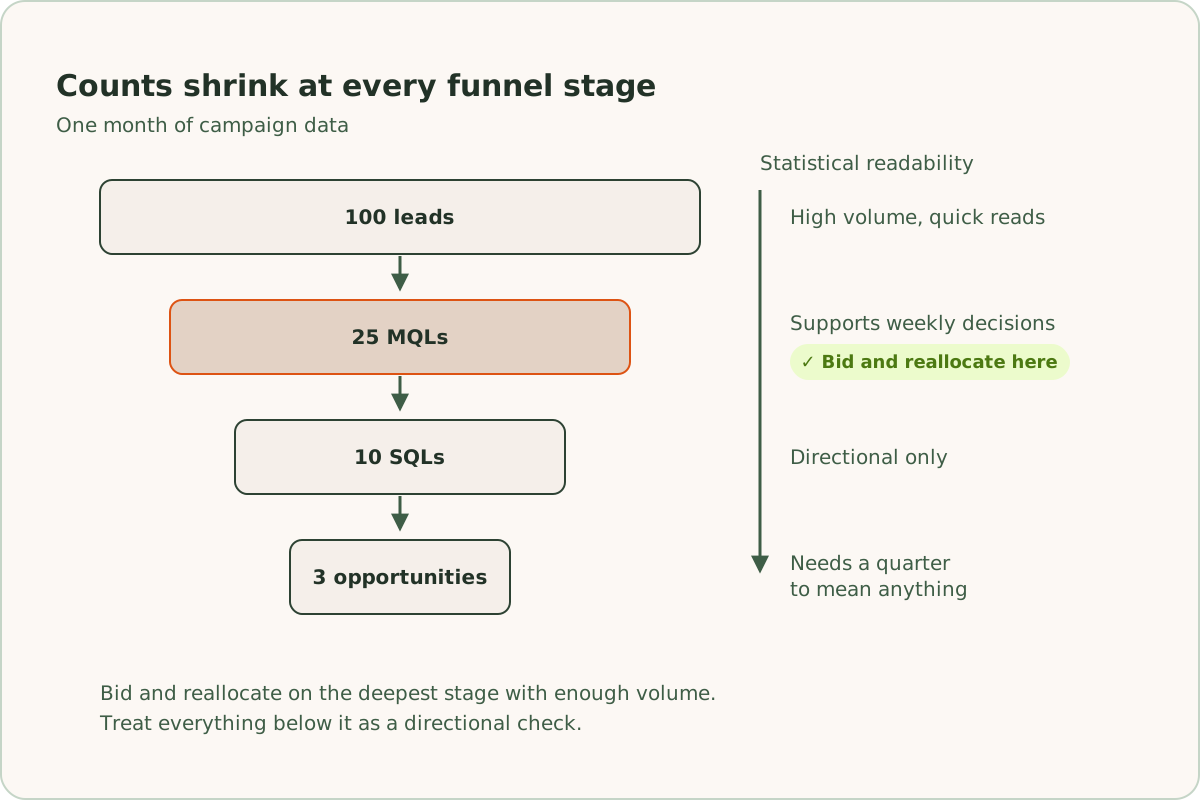
Each step down the funnel gets closer to revenue and further from statistical comfort, because the counts shrink at every stage. For example, a campaign might produce 100 leads, 25 MQLs, 10 SQLs, and 3 opportunities in a month. The MQL number supports weekly decisions. The opportunity number might need a quarter to mean anything. Our working rule is to bid and reallocate on the deepest stage that still has enough volume to read. Everything below that stage is a directional check. If the line between the MQL and SQL stages is fuzzy in your organization, MQL vs SQL covers where to draw it and who owns each side.
How does ReClick use cost per MQL?
ReClick manages lead generation accounts to cost per MQL, not CPL. CPL tells you what a form fill costs. Cost per MQL tells you what a prospect costs, and prospects are what you're buying. ReClick has served 35+ businesses that rely on lead generation and generated 20,000+ leads for them.
Getting to cost per MQL takes a written qualification bar, GCLID capture into your CRM, and an offline conversion feed back into Google Ads. ReClick builds that system, with ads, dedicated landing pages, and nurture working from the same data, as part of its Google Ads lead generation services.
Frequently asked questions
Quick answers to the questions readers ask most about this topic.
Cost per MQL is what you pay in advertising to generate one marketing-qualified lead (MQL): ad spend divided by the number of leads that cleared your qualification bar. Unlike cost per lead, cost per MQL filters job applicants, competitors, bots, and other junk out of the denominator before you divide. A campaign can't buy its way to a good cost per MQL with cheap, unqualified clicks.
Calculate cost per MQL by dividing total ad spend by the number of MQLs that spend produced. For example, $8,000 in ad spend, 100 leads, and 25 leads accepted as qualified make a cost per MQL of $320. Group leads by the date each one was created, not by the month it qualified, because leads often qualify weeks after the click. Segment by campaign before you average, because budget decisions happen at that level.
Cost per MQL is better than cost per lead for budget decisions because it counts only the leads that qualified. Cost per lead counts every form fill the same, so a campaign producing cheap, unqualified leads can look better than one producing real prospects. Cost per MQL reflects both what you paid for clicks and what share of the resulting leads were real. Expensive clicks that qualify at a high rate beat cheap clicks that never do.
Track MQLs back to Google Ads campaigns by capturing the Google click identifier (GCLID) on every lead. Google appends the GCLID to your landing page URLs. A hidden form field captures it, and your CRM stores it on the lead record. When a lead is marked qualified, an automation sends the GCLID, the conversion time, and a value back to Google Ads as an offline conversion. Google credits the conversion to the exact campaign, ad group, and keyword that produced the click.

Written by
Founder & CEO, ReClick
Corey runs Google Ads, landing page, and email nurture programs for businesses that rely on lead generation.
Keep reading
Which lead generation metrics should you track?
The lead generation numbers worth tracking at each stage of the funnel, from cost per click to cost per SQL, each with its formula and one worked example.
What is cost per lead? Formula and examples
Cost per lead (CPL) is ad spend divided by the leads it generates. How to calculate it 2 ways, with a worked example, and what the average hides.