
What is speed to lead?
Published June 30, 2026 · Updated October 23, 2026
Speed to lead is how fast a new lead hears back from you. The first minutes after a form submission decide whether a paid lead becomes a conversation.
Speed to lead is the time between a form submission and your first response to it. A lead who hears back in minutes is still interested, and a lead who hears back tomorrow often isn't.
Someone searched for what you sell, clicked your ad, read your landing page, and handed over their contact information. Every step in that chain cost you money. For example, the click alone can cost $15 in one market and $150 in another. Speed to lead measures what happens next. In most companies, nothing happens for hours.
Why does speed to lead matter?
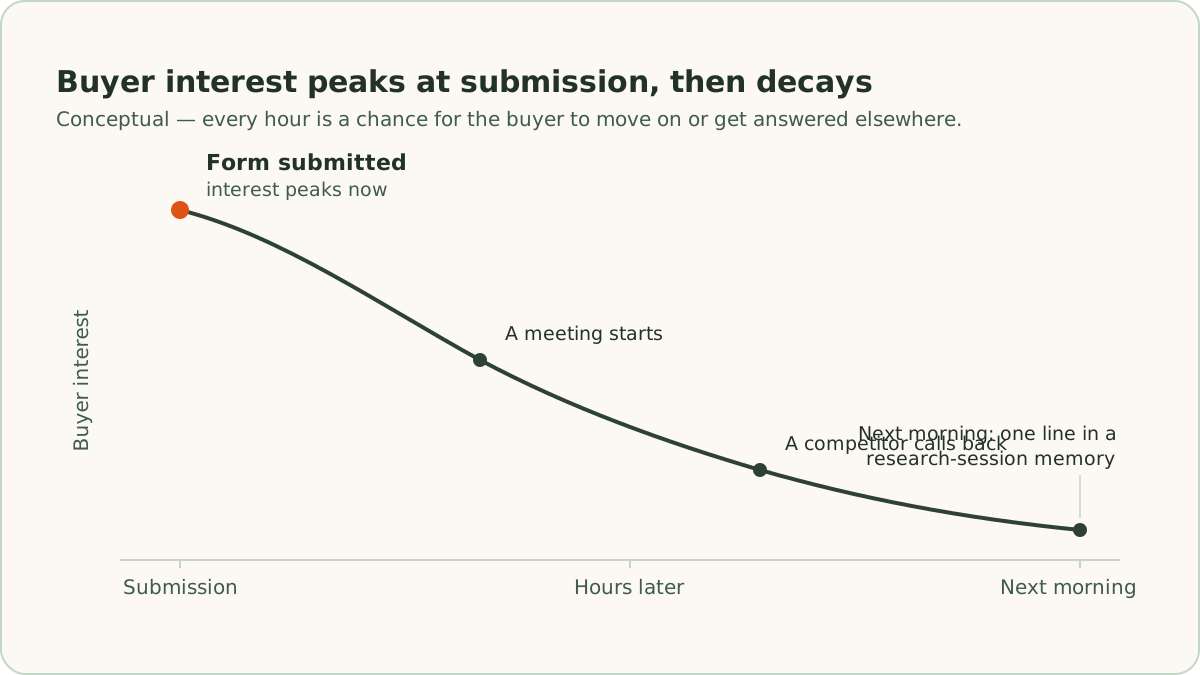
Speed to lead matters because a buyer is never more interested than at the moment they submit your form. Picture that moment from the buyer's side. They're at their desk with a browser open. They have a problem pressing enough to search for, and your page convinced them to raise their hand. They are also, very likely, filling out 2 or 3 other forms in the tabs next to yours.
Interest fades without anything dramatic happening. A meeting starts, lunch happens, or a competitor calls back. By tomorrow morning, your form is one line in their memory of a research session. The company that responded while they were still at their desk owns the conversation.
The case for speed rests on how people buy, not on any response-rate study. Interest peaks at the moment of submission. Every hour of lead response time is an hour for the buyer to move on, forget, or get answered by someone else.
How fast should you respond to a new lead?
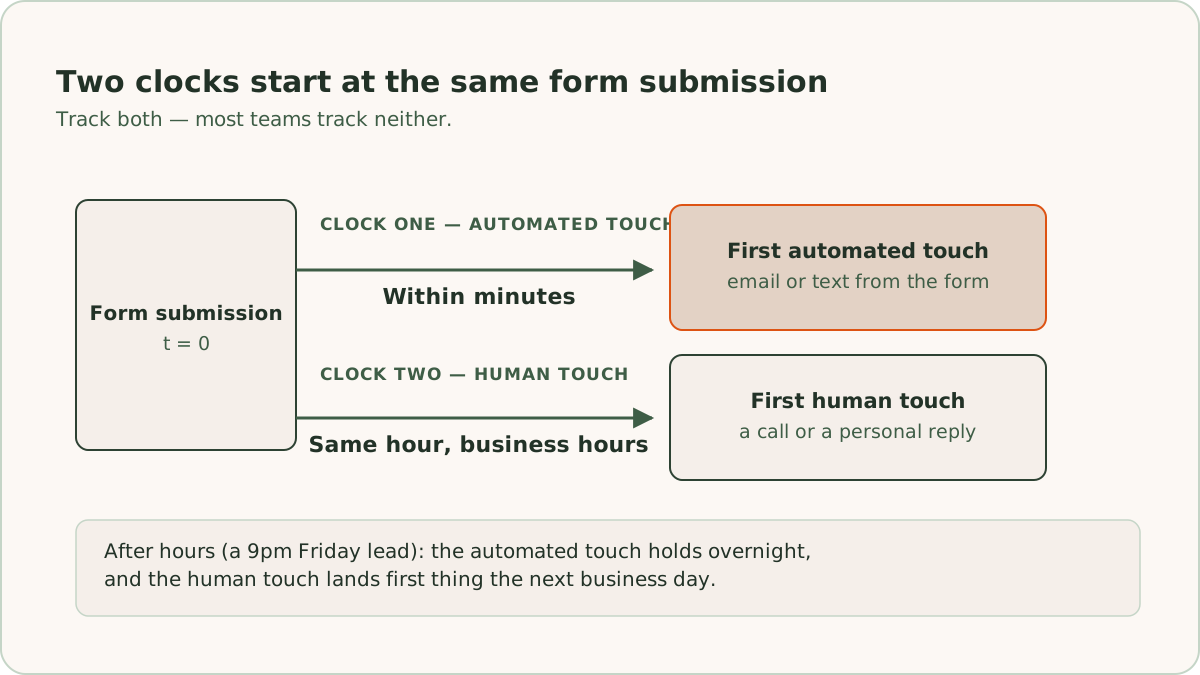
Respond to a new lead within minutes with an automated first touch, and within the same hour with a human touch during business hours. The 2 targets run on 2 separate clocks, and most teams track neither.
The first clock runs from the form submission to the first automated touch: the email or text the lead receives because they filled out your form. The first clock should read minutes. If your form only fires an internal notification, the lead hears nothing until a person gets around to it. In that case the first clock reads "never," which is worth knowing.
The second clock runs from the submission to the first human touch: a call, a personal email, or a reply to whatever the automation sent. For leads that arrive during business hours, the second clock should read the same hour. For leads that arrive at 9pm on a Friday, the realistic target is first thing the next business day. The automated touch on the first clock does the holding until then.
Some markets shrink that window to almost nothing. A rental inquiry goes stale within hours, because the prospect books a tour with whichever listing answers first. Our page on Google Ads for real estate covers how fast a rental inquiry decays and how that shapes the campaigns.
How do you measure speed to lead?
Measure speed to lead by subtracting each lead's submission time from the time of its first outbound activity. Pull the submission timestamps from your form tool or customer relationship management (CRM) system, and pull the timestamp of the first outbound activity for each lead. The work is tedious but quick. Use the median, not the average, because one lead that sat for 2 weeks will wreck an average. That one lead would hide the fact that most leads got a response in an hour. Then segment by business hours versus nights and weekends, because those are different problems with different fixes.
What counts as a first touch?
A first touch counts when it delivers something: the guide the lead requested, a straight answer about pricing ranges, or a specific next step with a name attached. That kind of first touch is a real response, even though a machine sent it. A bare "we have received your inquiry, ticket #4482" confirmation does not reset the buyer's clock. A confirmation only shows the form worked. The difference is whether the lead has a reason to stay engaged or just a receipt.
How does response time change cost per opportunity?
Response time changes cost per opportunity because everything downstream of the click divides by the number of leads you reach. Cost per lead (CPL) is where most reporting stops, but no one buys leads for their own sake. The number that matters is what a real conversation costs.
For example, an account spends $10,000 in a month and generates 125 leads, so its CPL is $80. Suppose slow follow-up means you connect with 40 of those 125 leads before they go cold. Your cost per conversation is $250. Now suppose faster response, an automated first touch plus same-hour human follow-up during business hours, means you connect with 70 of them. With the same spend, the same ads, and the same 125 leads, cost per conversation drops to $143. If 1 in 4 conversations becomes a qualified opportunity, cost per opportunity falls from $1,000 to $571 without a single change to the campaigns.
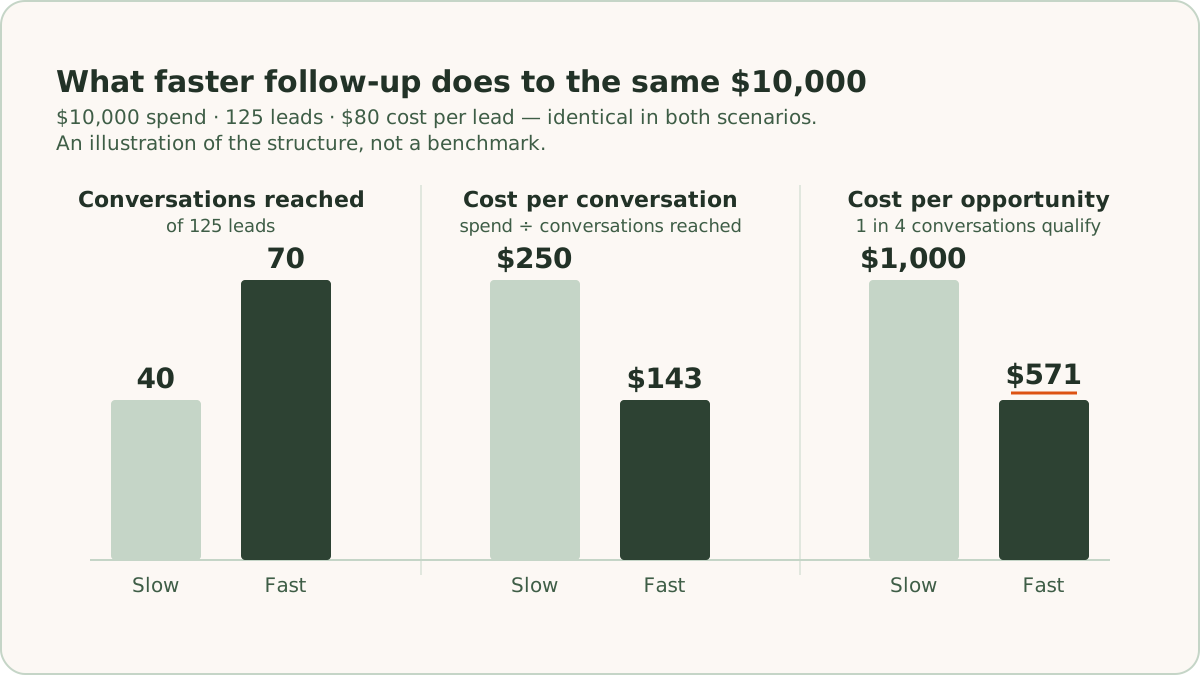
Those specific numbers are an illustration, not a benchmark. The structure of the math is what carries over. Contact rate multiplies through your entire funnel, and response time is the biggest lever on contact rate. Pulling that lever costs nothing in media.
How does slow follow-up affect Smart Bidding?
Slow follow-up corrupts the feedback loop that Smart Bidding depends on. Smart Bidding optimizes toward the conversions you send back to Google Ads. If leads go cold before anyone reaches them, they never become qualified, and the qualified signal never reaches Google. The algorithm then treats those clicks as bad and bids away from traffic that was fine.
Where do the minutes go?
The minutes go to hand-offs between the form, the inbox, and the rep, and nobody sees the total. Before fixing lead response time, map it. Take one recent lead and trace its submission through your systems, timestamp by timestamp.
A typical chain looks like this. The form fires a notification email to a shared inbox. Someone checks that inbox a few times a day and forwards the lead to whichever rep seems right. The rep is in meetings until 3pm, drafts a reply, and then decides to call tomorrow morning instead. Each step is reasonable on its own. Stacked up, the steps turn a 5-minute task into a next-day response. Nobody in the chain can see the total, because everyone owns only their own segment.
The audit usually surfaces the same causes. Notifications go to an inbox instead of triggering an action. New leads have no defined owner. No automated touch covers nights and weekends. The CRM records when a lead was created but not when it was first worked. Some setups also have a spreadsheet between the form and the CRM, with a person copying rows across once a day. That spreadsheet is a response-time tax on every lead you buy.
How do you respond to a lead within minutes?
ReClick responds to new leads within minutes by wiring the form directly into the email platform and the CRM at the moment of submission. We run email and SMS follow-up as part of the same system that generates the lead, and that is deliberate. We build the landing page, so we control the form. There are no exports, no spreadsheet in the middle, and no batch sync that runs overnight. ReClick has generated 20,000+ leads for its clients. Across them, the setup work that pays off most reliably is the plumbing between the form and everything that fires after it.
What should the automated first touch say?
The automated first touch delivers what the page promised, says what happens next and when, and comes from a real person's name. The first email goes out within minutes of the submission, triggered by the form itself. The email is written before the campaign launches, not improvised later. Whatever the page promised (the guide, the pricing overview, the audit) arrives in it, with a reply address a person reads. Where the audience expects it and consent allows it, a short text message (SMS) does the same job faster: a confirmation, a name, and when they'll hear from someone.
The first touch is the top of a longer sequence, not a one-off. If the lead doesn't book or reply, the follow-up continues on a schedule instead of depending on someone remembering. Our guide to building a nurture email sequence covers how to structure it.
When should sales get the alert?
Sales should get the alert at the same moment the lead gets the first email. The automation buys time, but it doesn't replace the phone call. The same form submission that triggers the lead's email also alerts the sales owner immediately, with the full form data in the notification. The rep can then decide in 10 seconds whether the lead is a drop-everything lead or a normal-queue lead.
The decision is easier when leads carry a grade. We score leads from first inquiry onward and send those values back to the ad platform. The notification a rep receives already signals how much the lead resembles past business. If you don't have a grading system yet, our guide on how to build a lead scoring model is the place to start. Even a rough tier on the notification changes who gets called first.
How do you follow up with leads who aren't ready yet?
Follow up with leads who aren't ready yet by capturing their readiness timeframe and scheduling an alert to sales for when it arrives. Not every lead is ready now, and most speed-to-lead thinking stops short here. A lead who says "we're planning for next quarter" is an early lead, not a dead one. The worst thing you can do is let a rep chase them hard for a week, give up, and forget them.
ReClick captures a readiness timeframe as a field, on the form where it fits or on the first call where it doesn't: this month, next quarter, or 6 to 12 months out. The field syncs from the CRM to the email platform as a tag, and the tag does 2 things. The tag routes the lead into nurture content matched to their stage instead of "book a call now" pressure. The tag also schedules an automated alert to sales when the lead reaches their stated window. A "next quarter" lead in October generates a task in January, whether or not anyone remembered.
Speed applies to nurture the same way it applies to sales. The lead's buying window opens twice: once at the original submission, and again when their stated timeframe arrives. Being first matters both times. The second time is easier to win, because almost nobody shows up for it.
When a nurture lead re-engages on their own (replies, books a call, or submits another form), the flow pauses. If the deal stalls and they go quiet again, the flow resumes from where it paused rather than restarting from email one. Nobody should get the welcome email twice.
How do you respond fast without sounding automated?
A fast response sounds human when it comes under a person's name, refers to the specific thing the lead asked about, and asks one question. Speed loses its value if the first touch reads like a ticketing system wrote it. A lead who receives "Your inquiry has been logged" learns that your form works. A lead who receives a plain email under a person's name, about the thing they asked, learns that someone is paying attention.
The mechanics are simple. Write the subject line the way a person would: "your pricing question" beats "RE: Website Inquiry #201." Use the form data. If the form asked what service they need or what their timeline is, the first email should reflect the answer, which dynamic fields make straightforward. Ask exactly one question, the one whose answer moves the deal forward, usually about timing or scope. Keep the email short, because the goal of the first touch is a reply, not a pitch.
The first email also carries the message match that runs from keyword to ad to landing page. The lead searched for something specific, your ad promised it, and your page delivered it. Your first email should continue that same thread rather than switching to a generic company voice.
How often should you check response time?
Check median lead response time weekly, next to spend and cost per lead, because speed to lead decays without maintenance. Forms get rebuilt, and someone forgets to reconnect the automation. A rep leaves, and their notification routing goes nowhere. A new campaign launches with a new form that never got wired in. ReClick runs weekly account checklists for this reason, and follow-up plumbing is on the list because it breaks silently.
You already paid for the lead, and the first minutes after the submission decide whether it becomes a conversation. An automated first touch wired directly to the form, a parallel alert to sales, and scheduled readiness follow-ups improve the funnel without adding ad spend. ReClick builds and maintains that system alongside the campaigns that feed it, as email and SMS nurture added to a Google Ads engagement.
Frequently asked questions
Quick answers to the questions readers ask most about this topic.
Speed to lead is the time between a form submission and your first response. There are 2 clocks worth tracking. The first runs from the submission to the first automated touch, the email or text the form itself triggers. The second runs to the first human touch, a call or a personal reply. Most teams track neither.
Respond to a new lead within minutes with an automated first touch. The first human touch should land the same hour for leads that arrive during business hours. For a lead that arrives at 9pm on a Friday, the realistic target is first thing the next business day, with the automated touch doing the holding overnight.
Responding to leads quickly matters because interest peaks at the moment of submission. At that moment the buyer is still at their desk, very likely filling out competitor forms in the tabs next to yours. Every hour of response time is an hour for them to move on, forget, or get answered by someone else. Contact rate also multiplies through the whole funnel, because everything downstream of the click divides by the number of leads you reach. That makes response time the biggest lever on what a real conversation costs.
Measure your speed to lead by subtracting each lead's submission timestamp from the timestamp of its first outbound activity. Pull the submission timestamps from your form tool or CRM, and pull the first outbound activity for each lead. Use the median rather than the average, because one lead that sat for 2 weeks will wreck an average and hide the fact that most leads got a response in an hour. Then separate business hours from nights and weekends, since those are different problems with different fixes.

Written by
Founder & CEO, ReClick
Corey runs Google Ads, landing page, and email nurture programs for businesses that rely on lead generation.
Keep reading
How do you build a lead nurture email sequence?
A lead nurture email sequence follows up with leads who aren't ready to buy yet: an instant reply, timed follow-ups, readiness branches, and clear exits.